AI-assisted development is quickly becoming part of our daily engineering workflow. Until now, however, there has often been a human sitting between the different steps: picking up a ticket, deciding whether it contains enough information, giving an AI agent the right context, asking it to implement the change, and finally creating a pull request.
With Azure Logic Apps Automation, currently in preview, we can start connecting those steps into a single automated process.
The key capability for us is the Logic Apps Automation sandbox. A sandbox provides an isolated compute environment in which agents can execute commands, work with files, operate on cloned source-control repositories, and invoke skills stored in those repositories. Prebuilt sandboxes can include repositories from Azure DevOps and make repository-based agent skills available during execution.
That opens up a very interesting possibility…
What if a task in for example Jira or Azure DevOps could go from “To Do” to an implemented change and an Azure DevOps pull request, with AI doing the engineering work and our repository defining how that engineering work should be done? ”
Our Repository Becomes More Than Source Code
Our Azure DevOps repository already contains an important part of our development knowledge: agent skills.
Agent skills turn our engineering knowledge into reusable instructions for AI agents. Instead of repeatedly explaining how our solutions should be built, tested, and changed, we define that knowledge once and keep it alongside the code. The Logic Apps Automation sandbox can clone an Azure DevOps repository, and an agent can be configured to use them.
This changes the role of the repository.
It no longer contains only the application source and infrastructure definitions, it can also describe how an AI agent should work with that source.
Automating Our Flow
In our case we will use Jira as our management tool where tasks are created and are to be picked up by the development team.
When an item is moved to the “To Do” stage, we use that event to trigger a Logic Apps Automation workflow.
Our process now looks like this:
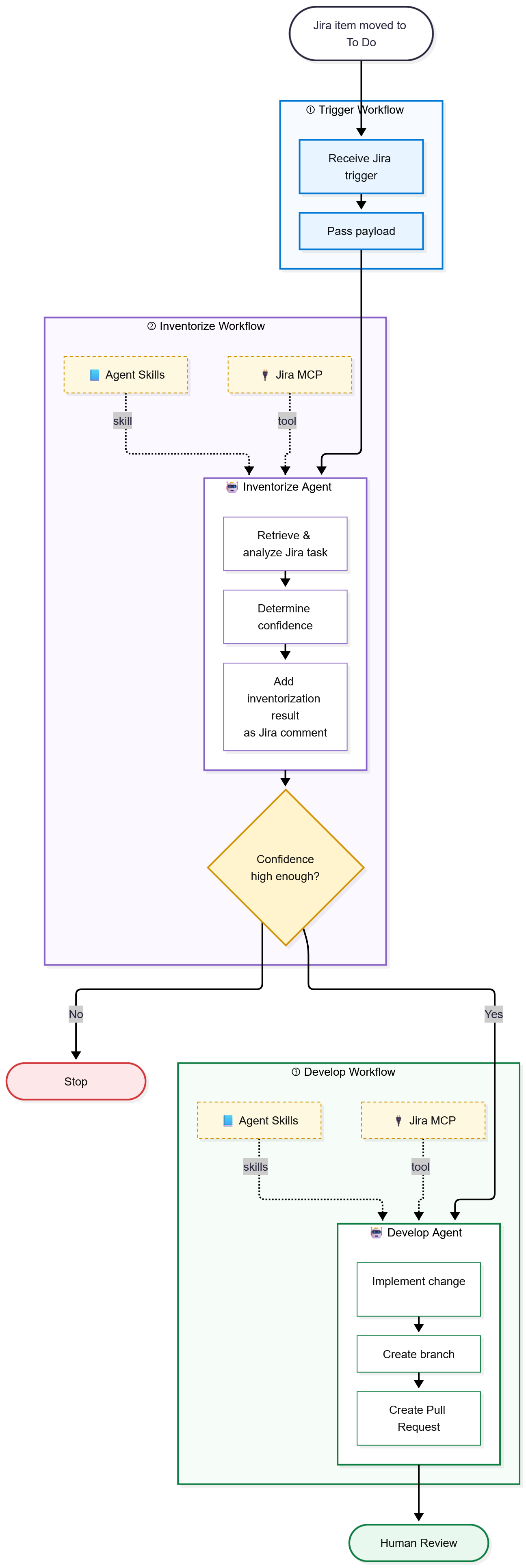
When an item is moved to To Do, it triggers our Logic Apps Automation process. Rather than building everything into one large workflow, we’ve split the process into three workflows, each with a clear responsibility:
- Trigger
- Inventorize
- Develop
Each workflow has a specific purpose, and the agents within those workflows have access to the tools and skills they need to perform their job.
Trigger
The first workflow is deliberately simple.
It receives the event when a Jira item is moved to To Do and passes the Jira payload to the next workflow.
There is no AI reasoning involved at this point. The Trigger workflow is simply the entry point into our automated development process.
Inventorize
Moving a Jira item to To Do doesn’t automatically mean we want an AI agent to start changing code. First, we need to answer a much more important question:
Does the agent have enough information to confidently develop this task?
That is the responsibility of our Inventorize Agent.
The agent has access to the Jira MCP server, which it uses to retrieve and inspect the Jira task and its available information. It also has access to our Inventorization Agent Skill. This skill contains the knowledge and instructions the agent needs to determine whether the task contains sufficient context and requirements for autonomous development.
The agent retrieves and analyzes the Jira task, determines its confidence, and adds the result of that inventorization back to the Jira item as a comment. This makes the reasoning visible rather than silently letting the automation make a decision in the background.
If the confidence is too low, the automation stops. If the confidence is high enough, the Jira task is passed to the next workflow.
This confidence gate is an important part of the process. AI automation becomes much more useful when an agent is allowed to say “I don’t know enough yet” instead of being forced to produce a solution for every ticket.
Develop
Once the task has successfully passed the inventorization stage, the Develop workflow takes over.
This time, the agent’s responsibility is no longer to determine whether the task can be implemented. Its responsibility is to actually implement it. The Develop Agent again has access to the Jira MCP server, providing the task context, and to our agent skills, providing the engineering knowledge needed to work with the solution.
This is where the Logic Apps Automation sandbox becomes particularly interesting. The sandbox gives the agent an isolated environment in which it can work with our Azure DevOps repository. The agent can work against the actual codebase and use the skills we maintain for that repository.
From there, the agent can implement the requested change, create a branch, and ultimately create a pull request in Azure DevOps.
AI doesn't replace our DevOps process. It participates in it. ”
Wrapping up
Logic Apps Automation feels like a natural next step in how we use AI in software development. We are moving beyond developers manually asking AI for help and towards AI becoming an automated part of the development process itself.
By combining workflows, agents, MCP servers, agent skills and our existing DevOps practices, we can let AI pick up suitable tasks and help us implement them for us. This allows us to speed up our development process and spend less time on repetitive implementation work, while still keeping developers in control through existing practices such as pull requests and human review.
Logic Apps Automation might still be in preview, but it already looks like a very exciting addition to our development toolbox!