The limits of Azure RBAC
Centralizing an Azure Container Registry (ACR) across teams, inside or outside your organisation, is common practice in modern architectures. Keeping access to this resource secure and limited is essential, but traditionally this required making trade-offs.
With Azure RBAC, roles such as AcrPull or AcrPush are assigned to an identity at the registry resource scope. Once permissions are granted, the identity can use those permissions on every repository within the registry, as RBAC does not provide repository-level access control.
In shared team environments, this can quickly become problematic because it conflicts with least-privilege principles and modern zero-trust architectures.
CI/CD pipelines, workloads, and teams often require access to only a subset of images. With traditional RBAC, permissions frequently become broader than intended.
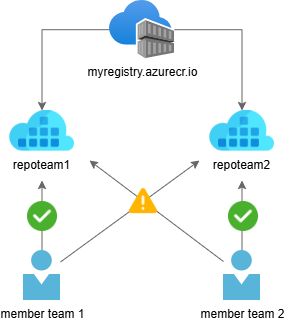
A more precise approach with ABAC
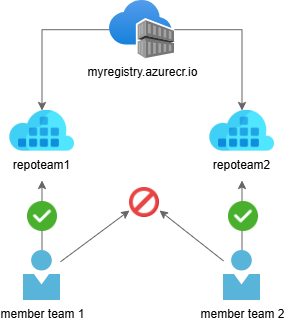
With the introduction of Azure ABAC for Azure Container Registry, these trade-offs between security and usability are no longer necessary. ABAC enhances security by enabling granular, repository-level permissions.
Azure ABAC extends Azure RBAC by adding repository-specific conditions to role assignments. Using ABAC, administrators can grant permissions via role assignments that include conditions based on repository attributes.
Azure RBAC defines:
- Who – the identity
- What – the permission
- Which resource scope – the target resource (for example, a container registry)
ABAC adds an additional authorization layer within the resource scope, allowing permissions to be restricted to specific repositories, patterns, or namespace prefixes.
ABAC conditions evaluate attributes such as repository name to determine whether a requested operation (for example pull, push, or delete) is permitted.
This allows platform teams to maintain a shared registry while still enforcing clear boundaries between teams, workloads, or environments, without creating multiple registries or granting over-privileged access.
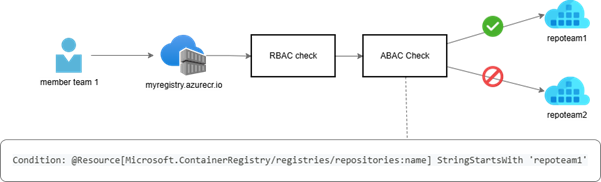
How repository-scoped access works
When an identity performs a repository operation, Azure evaluates:
- whether the identity has a role assignment that grants the requested operation (RBAC)
- whether the ABAC condition attached to that role assignment evaluates to true (for example, matching the repository name or prefix)
Access is granted only when both the RBAC permission and the ABAC condition succeed.
This approach preserves the familiar RBAC model while enabling fine-grained repository-level authorization within a registry.
Enabling ABAC on Azure Container Registry
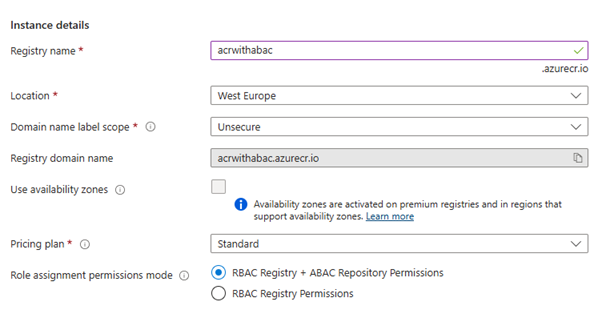
To use repository-scoped permissions, ABAC must first be enabled on the Azure Container Registry.
This is done by setting the Role assignment permissions mode to:
‘RBAC Registry + ABAC Repository Permissions’
This mode preserves existing RBAC behavior for registry management while enabling repository-level access control for image operations.
Granting access to specific repositories
Once ABAC is enabled, role assignments can include conditions based on repository attributes.
For example, you can grant read access only to repositories that start with a specific prefix, such as demo/:
az role assignment create \
–assignee “<principal-id>” \
–role “Container Registry Repository Reader” \
–scope “/subscriptions/…/registries/<registry-name>” \
–condition “(@Resource[Microsoft.ContainerRegistry/registries/repositories:name] StringStartsWith ‘demo/’)” \
–condition-version “2.0”
With this configuration, the identity can pull images only from repositories that match the condition.
ABAC-enabled built-in roles
When ABAC is enabled, Azure introduces repository-scoped roles designed specifically for image access:
- Container Registry Repository Reader
Image pull and metadata read permissions, including permissions for HEAD requests, GET manifest requests, GET layer blob requests, tag resolution, and discovering OCI referrers. - Container Registry Repository Writer
Repository Reader permissions, as well as image and tag push permissions. - Container Registry Repository Contributor
Repository Reader and Repository Writer permissions, as well as image and tag delete permissions.
If you also want the ability to list repositories, Azure provides an additional role:
- Container Registry Repository Catalog Lister
Allows listing all repositories in the registry. This role does not support ABAC conditions.
Important behavior changes to keep in mind
Enabling ABAC repository permissions changes how access to container images is evaluated.
Legacy roles such as AcrPull, AcrPush, and AcrDelete no longer grant access to container images once ABAC is enabled and should no longer be used for repository access.
General roles such as Owner, Contributor, and Reader also no longer provide access to container images. These roles remain control-plane roles, meaning they allow management of the registry resource itself but not access to image content. Image access must instead be granted explicitly using repository-scoped roles with ABAC conditions.
In addition, ACR Tasks and Quick Runs no longer receive implicit access to source registries and must be granted the appropriate repository-scoped permissions.
Why this matters
ACR repository permissions with ABAC make least-privilege access practical.
Teams can operate a single shared registry while clearly separating ownership and access per repository. This avoids granting broader permissions than necessary and improves overall security.
For teams operating AKS clusters, CI/CD pipelines, or multi-tenant platforms, this provides a cleaner and more secure access model without introducing additional operational complexity.
Considerations when getting started
If you are creating a new registry, you can enable ABAC repository permissions from the start.
In case you are enabling ABAC on an existing registry, reviewing current role assignments beforehand is strongly recommended. Existing permissions based on legacy roles may no longer grant image access once ABAC is enabled, which can lead to unexpected disruptions in workloads, CI/CD pipelines, or cluster deployments.
Tip from the field: Repository namespace design
When using repository-scoped permissions with ABAC, repository naming becomes part of your security model.
Because access can be granted based on repository name or prefixes, designing a consistent repository namespace makes permission management significantly easier.
A common pattern is to structure repositories by team, workload, or platform responsibility.
Example structure:
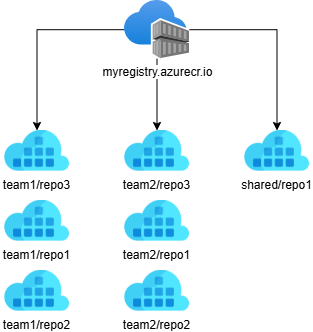
Using this structure, access can be granted with prefix-based conditions. For example, a role assignment could allow access only to repositories belonging to team1:
(@Resource[Microsoft.ContainerRegistry/registries/repositories:name]
StringStartsWith ‘team1/’)
This allows an identity to access all repositories under the team1 namespace without granting access to other teams’ images.
Designing repository namespaces early provides several advantages:
- Simpler permission management
- Clear ownership boundaries
- Scalable access control as teams grow
- Alignment with least-privilege principles
For shared registries in large platforms, a well-designed namespace structure often becomes the foundation of the ABAC access model.
Secure your container registry with Codit
From designing secure repository structures to implementing fine-grained access control with ABAC in Azure Container Registry, Codit supports organizations in building secure and scalable container platforms.
Beyond advisory and engineering expertise, Codit offers managed services that help ensure your container registries and platform components remain secure, compliant, and aligned with best practices.
If you’re looking to implement repository-scoped permissions, strengthen your container supply chain, or operate a shared registry at scale, Codit is ready to support you at every stage, from architecture and implementation to ongoing operations.
Subscribe to our RSS feed
Talk to the author
Contact Gillian
Domain Lead