Probably you used the Azure Portal to create your first Service Fabric cluster, but when done playing with it, it seems impossible to deallocate/stop/suspend your cluster so you are not paying for the cluster nodes. The Azure Portal appears to expose no obvious way to “disable” the cluster.
One way would be to delete all resources that make up the cluster or delete the whole Resource Group and recreate it when you want to use it again.
Imagine you have a test environment that only needs to run once a week. I can imagine you don’t want to recreate it every week but you also don’t want to pay for all this when you are not using it. Good news, there is a solution, and I’m here to tell you!
First deactivate the necessary nodes with the Service Fabric cluster Explorer, otherwise you might have problems getting your cluster back up and running.
Service Fabric cluster nodes reside within a Virtual Machine Scale set, through PowerShell and even with the Azure portal you can disable instances within the Scale set:
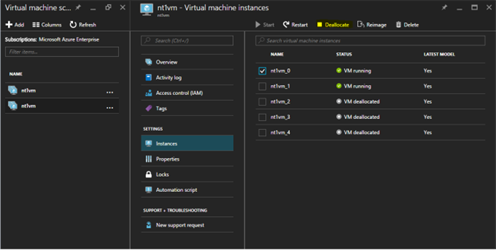
Stop-AzureRmVmss -ResourceGroupName “resource group name” -VMScaleSetName “scale set name” -InstanceId #
Now you can deallocate your Service Fabric cluster whenever you want!
Subscribe to our RSS feed