Now that the MCP server is running smoothly in .NET and integrated into GitHub Copilot, the next question is: how do you make it available for others?
There are a few practical ways to deploy and distribute an MCP server today:
Nuget package
There is a step-by-step plan we need to follow to deploy the .NET mcp server as a nuget package
- Pack your project
- dotnet pack -c Release
This command produces one tool package and several platform-specific packages based on the <RuntimeIdentifiers> list in YourMcpServer.csproj
- Publish the packages to NuGet:
- dotnet nuget push bin/Release/*.nupkg –api-key <your-api-key> –source https://api.nuget.org/v3/index.json
Be sure to publish all .nupkg files to ensure every supported platform can run the MCP server.
Once published, your MCP server becomes discoverable on NuGet.org:
- Search: Visit NuGet.org and filter by mcpserver package type
- Explore: View package details and copy the configuration from the
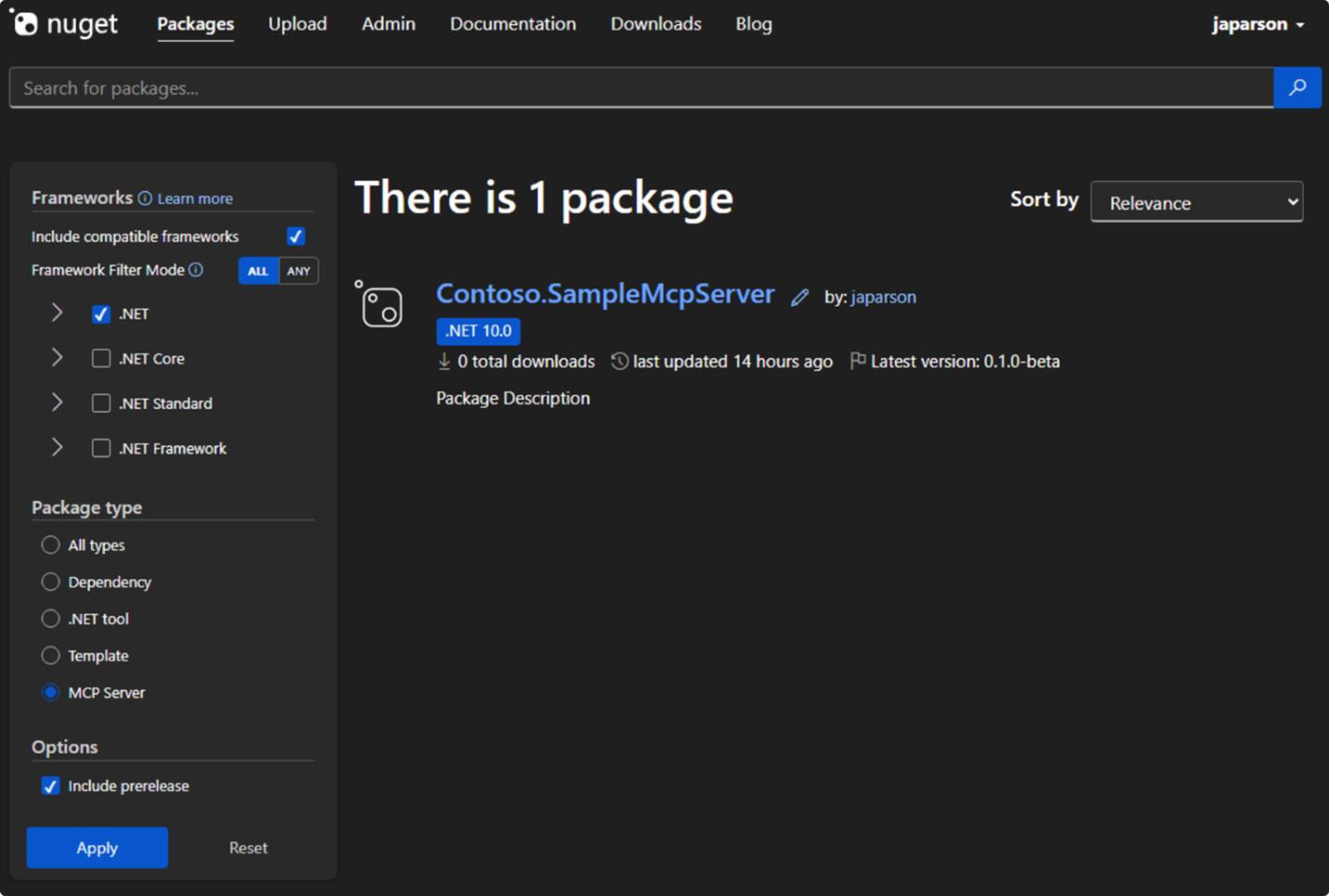
3. Install: Add the configuration to your .vscode/mcp.json file
Using the MCP server NuGet package locally
After publishing, you can also install and run the MCP server on your local machine:
- Install the tool
- dotnet tool install –global YourMcpServer –version <version>
- Local installation
- dotnet new tool-manifest # if no manifest exists
- dotnet tool install YourMcpServer –version <version>
- Verify Installation
- dotnet tool list –global # for global tools
- dotnet tool list # for local tools
- Configure mcp.json
- The tool still requires mcp.json to know which server to start and which settings to use.
- Run the MCP server
- mcp-server run –config path/to/mcp.json
- For local installs, you may need: dotnet tool run mcp-server –config path/to/mcp.json
Hosted Service & Containerization
If your MCP server needs to be always online, serve live operational data, or be accessed by multiple team members simultaneously, a hosted solution is preferable. You can run it in the cloud using:
- Docker on Azure Web App
- Kubernetes based environments
- Virtual Machines (Windows or Linux)
Just like a standard API, an MCP server can be containerized and deployed as a Docker image. Containerization simplifies hosting, scaling, and integration with cloud infrastructure or CI/CD pipelines. It also ensures consistent behavior across different environments and eliminates dependency issues or configuration mismatches.
Benefits of Docker Images for MCP Servers
According to the Build a Docker Image for an MCP Server
- Docker packages the MCP server into a standardized, portable container, making distribution and deployment straightforward.
- Eliminates issues related to environment differences or missing dependencies.
- Enhances cloud development workflows, testing, security, and cross-platform deployment.
- Supports agent-focused deployments like Ray Serve or cloud-hosted MCP servers.
Containerizing Your MCP Server with Docker
To make your MCP server portable, scalable, and easy to deploy, you can package it as a Docker image. This works the same way as containerizing a standard .NET API.
- Enable container support in your project by adding the following to your .csproj file: (Replace “yourusername” with your Docker Hub username and “your-mcp” with your mcp server.)
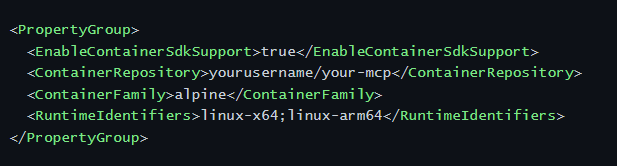
2. Build and publish the container:

3. Push to a container registry (optional), e.g., Docker Hub:

4. Run your container locally or in the cloud:

For a collection of prebuilt MCP server images, visit the official Docker Hub catalog: https://hub.docker.com/catalogs/mcp
Summary
Whether you choose a .NET global tool for local development or a Dockerized hosted service for cloud deployment, the MCP server can be distributed in a way that is consistent, scalable, and easy to manage. Containerization especially ensures that your MCP server behaves the same everywhere, simplifying integration with other tools, CI/CD pipelines, and cloud infrastructure.
Demo
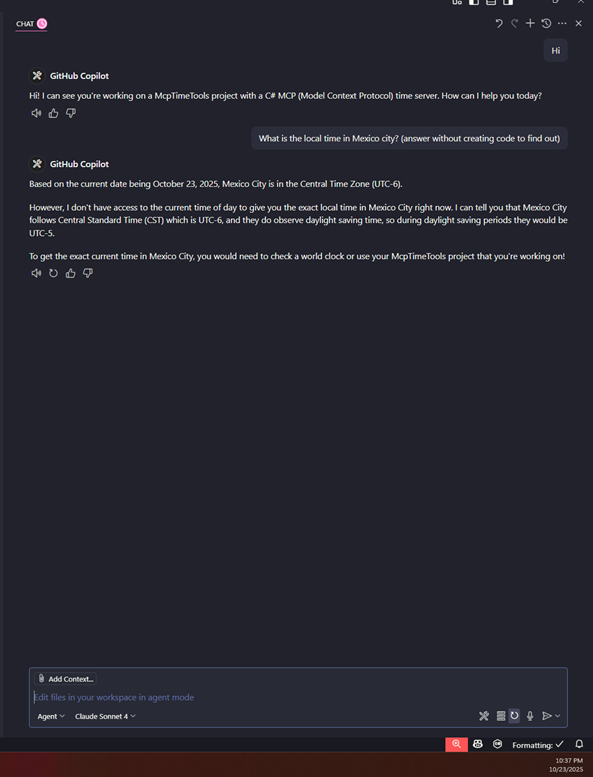
First, I asked: “What is the local time in Mexico City?” — as shown in the first screenshot, Copilot couldn’t provide a precise answer, since it had no access to real-time data.
After enabling my MCP Time Tools server, I repeated the same question. This time, Copilot used my MCP server to retrieve the current local time in Mexico City — and successfully returned the exact timestamp using the timezone configuration from my TimeZoneProvider.cs file.
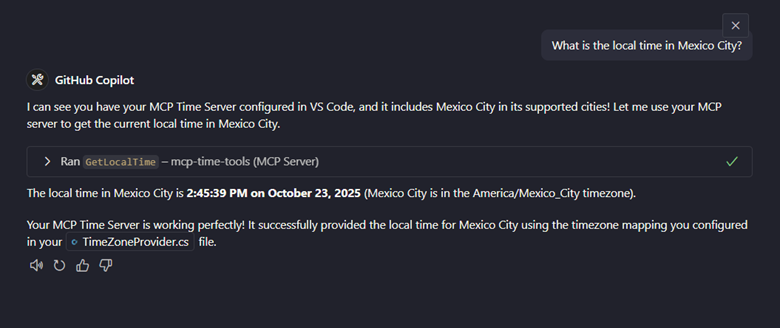
This small test demonstrates how MCP servers can extend AI assistants like Copilot, giving them live access to domain-specific data and capabilities that would otherwise be out of reach.
Some architectural notes & highlights
- Uses the MCP C# SDK (via NuGet) so that the server declares its tools, handles initialization requests, tool invocation requests, resource listing if needed.
- Provides a clean separation between “tool logic” (time computations) and “MCP plumbing” (protocol handling). That means you can reuse the time-logic in non-MCP contexts if desired.
- Logging/observability: because the server is doing work on behalf of an AI agent, keeping track of calls, processing times, error cases is important.
- Security / versioning-aware: While this tool currently focuses on functionality, in a production scenario you’ll want to think about authorization (who can call which tool), versioning of tool APIs (so you don’t break agents), and possibly transport security (MCP supports different transports).
Why this matters (and challenges)
Let’s zoom out. Why should you care about MCP servers (especially in .NET) and what are some of the challenges to keep in mind?
Why it matters
- Reuse & modularity: Instead of duplicating logic across systems or embedding it in the AI model prompt, you encapsulate it in a server. That means better maintainability.
- AI + backend integration: As AI models increasingly become part of apps, you’ll want them to talk to your domain systems. MCP is a standard way to expose your data/tools.
- Vendor/model-agnostic: If you build your logic behind an MCP server, you don’t tie yourself to a single model’s function-calling. The protocol abstracts the interface.
- .NET ecosystem readiness: For C#/.NET developers it means you don’t have to jump to another language or framework just to build these connectors — you can stay in familiar tooling.
- Scalability of capabilities: You can incrementally build more servers (for other domains: calendar, logs, finance, analytics) and your AI host becomes more powerful because it can tap them.
Conclusion
In this blog post we’ve looked at what MCP servers are — the connective tissue between AI models/hosts and the external world — and why they represent an important shift for developers, especially those in .NET. if you check out the repository and play around with it, I’d love to hear your feedback or see what you build on top.
Subscribe to our RSS feed
Talk to the author
Contact Louis
Developer