My current project: McpTimeTools (a plugin server for time intelligence)
In this post I’ll explain what MCP servers are (especially in the .NET ecosystem), walk you through my current project (see: GitHub – McpTimeTools)
So – what am I building? My GitHub repository McpTimeTools is a .NET toolset / server (or set of tools) that leverages the MCP pattern to make time-related functionalities available to AI-enabled systems.
Used NuGet-packages
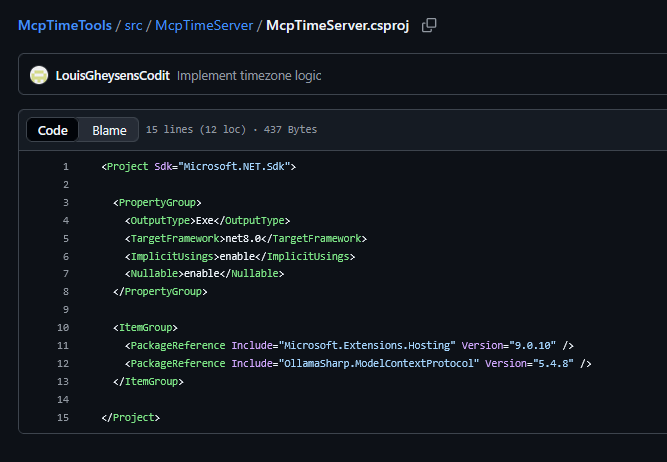
Microsoft.Extensions.Hosting
This package provides the .NET Generic Host infrastructure. It gives your project a structured startup pipeline, dependency injection, logging, and lifecycle management. The MCP server runs as a hosted application, so this package forms the backbone of the server runtime.
OllamaSharp.ModelContextProtocol
This package contains a community implementation of the Model Context Protocol for .NET. It provides the attributes and server tooling used to expose methods as MCP tools, such as McpServerTool and McpServerToolType. Without this package, the server wouldn’t know how to register or publish tools to MCP-compatible clients.
What it does
Here’s a high-level summary of what the tool offers (for now):
- It is built in .NET (C#) and implements an MCP server to provide “time”-related functionality — for example retrieving current time in various formats, converting between time zones etc.
- The idea is: if an AI agent or application needs to reason about time — “What’s the time difference between Brussels and New York?”, “Schedule a job for 09:15 tomorrow in CET”, “Convert this timestamp to UTC” — instead of you writing bespoke logic each time, you provide a standardized server that supports these operations.
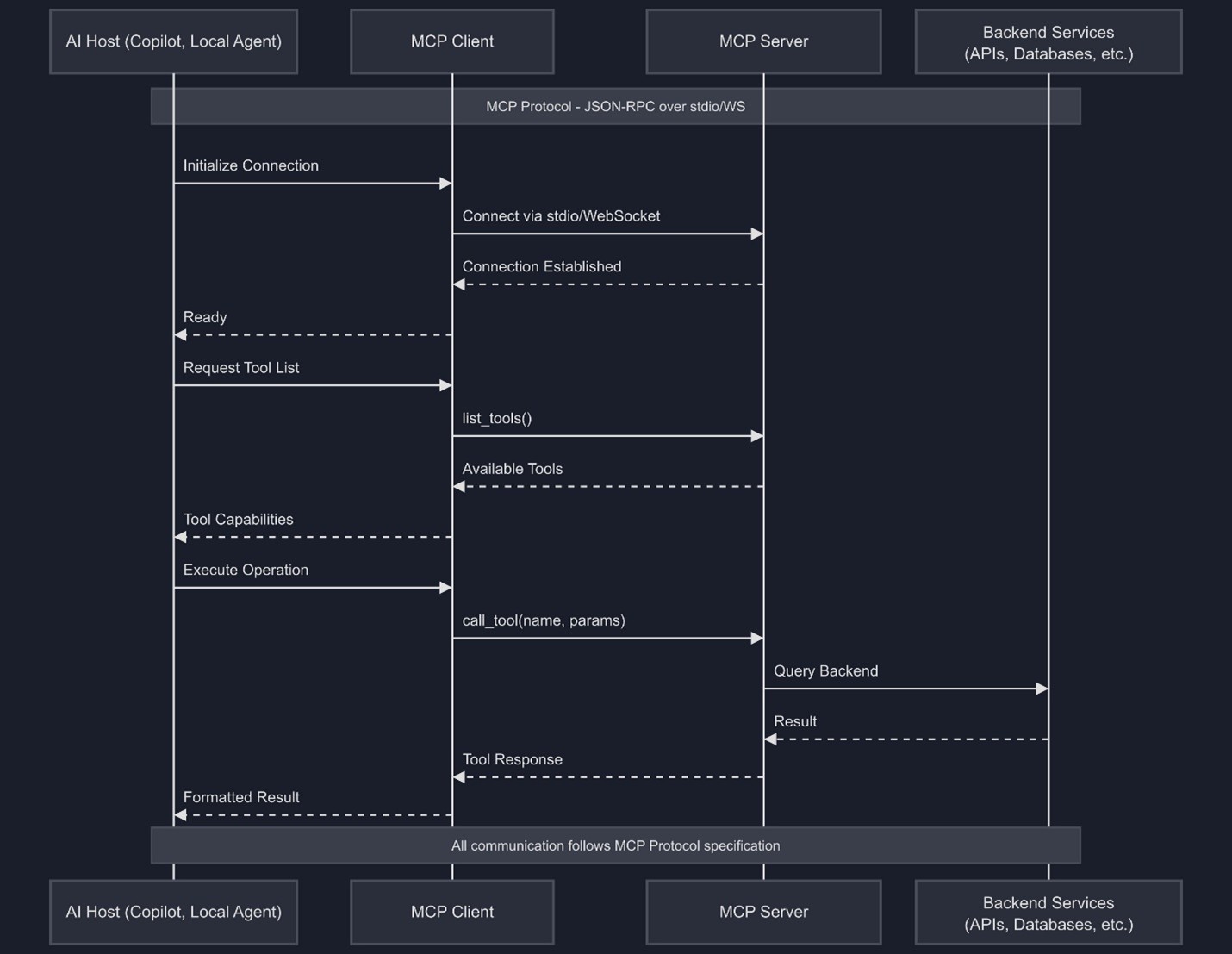
- The server exposes the tools via the MCP protocol, so a host (AI agent) can discover: “Okay, there’s a tool for time conversion”, call it with parameters, get results, all through the MCP mechanism.
Why I built it
- Time logic is deceptively tricky in distributed systems: time zones, daylight saving shifts, scheduling semantics, time arithmetic — these are classic sources of bugs. By exposing this logic via an MCP server, I make it accessible in a clean, reusable, discoverable fashion.
- It’s a testbed for MCP in .NET: building this server gave me hands-on experience with the MCP C# SDK (and protocol), tool discovery, message handling, transports.
- It enables AI-enabled workflows: Say you have an agent that needs to plan meetings, schedule tasks, generate reports with time stamps — now the agent can call this “time tool” server rather than hope the time logic is baked into the model or ad hoc. That makes your system more robust, maintainable.
- It sets a foundation for expansion: Today it’s time-tools, tomorrow you can imagine date-calendars, scheduling conflict detectors, aggregated logs by time period, etc., all exposed via the MCP pattern.
Securing your MCP Server
One thing to keep in mind when you start building your own MCP server — like my McpTimeTools — is security.
The Model Context Protocol (MCP) was designed to make tools easily discoverable and callable by AI agents. That’s great for interoperability, but it also means: if your server runs without any form of authentication, any client who can reach it could technically call your tools.
Here are the most useful best practices for security on an MCP server
- Always use TLS (HTTPS) to encrypt traffic.
- Require authentication (for example an API key, bearer token, or OAuth flow).
- Implement authorization to restrict which clients can call which tools.
- Apply the principle of least privilege — expose only what’s needed.
- Keep credentials and tokens out of source code, and rotate them regularly
- Use rate limiting to prevent abuse and control usage costs
How secure is an MCP server?
By default, the Model Context Protocol (MCP) doesn’t enforce any authentication or authorization. That means an MCP server is only as secure as the protections you add around it. In other words: security is the server’s responsibility.
(JSON Web Tokens) to control access. In C#, you can use the built-in ASP.NET Core authentication middleware to validate tokens issued by an authorization server such as Keycloak or Azure Entra ID. This ensures that only clients with valid tokens can access your tools or APIs.
For example, the server can require a Bearer token in each request and verify its issuer, audience, and signature before granting access. When configured this way, an MCP server inherits the same protection model as any modern web API.
Beyond basic token validation, several best practices strengthen your MCP server’s security:
- Always validate tokens against the correct issuer and audience.
- Enforce HTTPS in production — never send tokens over plain HTTP.
- Giving clients access only to the tools they need.
- Store secrets and cached tokens in secure, encrypted storage.
- Never log sensitive data such as authorization headers or tokens.
When implemented with JWT validation, HTTPS, and strict scope handling, an MCP server can be as secure as any enterprise-grade API. The protocol itself is flexible — it’s the server’s configuration and adherence to standard authorization frameworks that determine its real security.
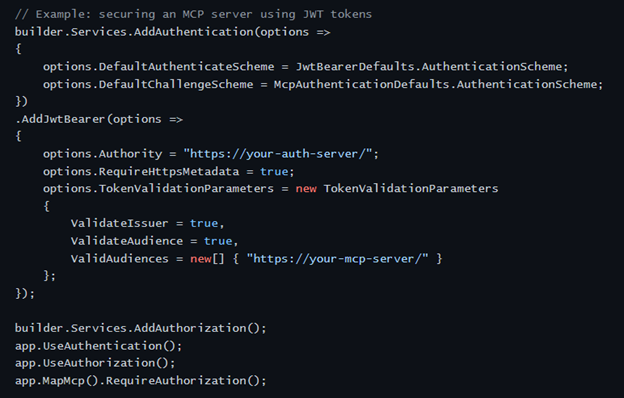
To illustrate how this works in practice, here’s how token-based authentication looks in C#
In your ASP.NET Core project, add JWT authentication using the AddJwtBearer mechanism. This ensures that every incoming request must include a valid token.
The MCP server can operate in two modes: a simple STDOUT mode and an HTTP mode. The following snippet shows how JWT authentication is configured for the HTTP version.
Because the HTTP mode accepts incoming requests, it needs proper authentication. That is why the example below uses JWT bearer tokens. The snippet demonstrates how the ASP.NET Core host is configured so that every request to the HTTP MCP server is validated against your identity provider.
Configuring the MCP server in Program.cs
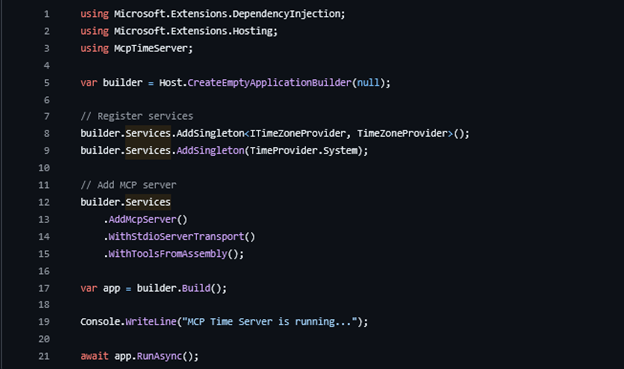
The heart of your MCP server lives in Program.cs, where you wire up the services and register the MCP runtime. The setup is deliberately minimal: first you register any application services your tools depend on, and then you attach the MCP server itself. And tell our server to search for Tools (or available APIs) from the running assembly.
In this example, the server is configured to use the standard I/O transport (ideal for local development or when running the server as a subprocess) and to automatically load all MCP tools from the current assembly. Once the host is built and started, the server begins listening for incoming MCP client connections.
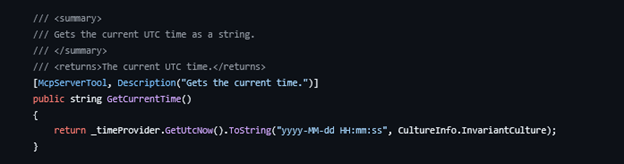
Defining a tool
In the startup configuration, WithToolsFromAssembly inspects the assembly for any classes marked with the McpServerToolType attribute and automatically picks up the methods decorated with McpServerTool. Each tool method includes a Description, and that text is passed along to any MCP client that connects. The client uses this description to understand what the tool does and decide which one to invoke.
Conclusion
Building an MCP server in .NET is very simple, providing a clean way to provide reusable tools, tight integration with the rest of the .NET ecosystem, and a solid foundation for AI-driven workflows that require reliable timing logic. It’s still early days for MCP in C#, but the pattern has already proven practical, scalable, and secure when combined with proper authentication. AI is advancing rapidly, so I expect MCP to evolve rapidly. With this foundation, extending the server with new capabilities is a simple next step rather than a redesign.
Subscribe to our RSS feed
Talk to the author
Contact Louis
Developer