Kubernetes remains the industry standard for orchestrating containerized workloads, but running it well is far from trivial.
Kubernetes gives teams a powerful, flexible control plane for running containerized workloads at scale, but that flexibility comes with operational overhead. You’re responsible for cluster lifecycle management, worker node updates, control plane health, security patching, OS upgrades, compatibility between Kubernetes and the underlying node images, and keeping pace with upstream deprecations. Running Kubernetes well requires discipline, automation, and continuous attention.
That’s why, in Kubernetes (and AKS), staying up‑to‑date is not optional. Kubernetes versions, patch levels, and node OS images all evolve on their own pace. Upgrading one without the others introduces drift: kubelet mismatches, container runtime issues, unsupported kernel versions, and subtle bugs that only appear under load.
Keeping your Kubernetes environment up to date means staying on top of two separate lifecycles: Kubernetes upgrades and Node OS upgrades.
Kubernetes upgrades determine how your cluster behaves: they change the control plane, kubelet, APIs, features, and security posture.
Falling behind means running deprecated APIs, missing security fixes, and eventually losing support.
OS upgrades determine the environment your workloads actually run on: kernel patches, container runtime updates, and critical security fixes.
Even if Kubernetes itself is up to date, an outdated OS leads to CVEs, kernel bugs and runtime issues.
They both matter. Updating one without the other introduces drift, instability, and operational risk.
Introducing Azure Kubernetes Service (AKS)
This is where AKS provides real value.
AKS helps by pairing validated OS images with supported Kubernetes versions, so your cluster stays aligned and predictable.
It takes the operational burden out of running Kubernetes by managing the control plane for you—handling upgrades, API server health, security patches, and integration with the broader Azure ecosystem. Instead of maintaining masters, etcd, and cluster internals, teams can focus on workloads while AKS ensures the platform stays aligned with cloud best practices.
The AKS ecosystem evolves quickly. With frequent Kubernetes minor releases, weekly patch updates, and ongoing OS lifecycle changes, organizations face a growing challenge: staying secure, compliant, and reliable, without slowing down innovation.
Understanding the AKS release cycle
The Kubernetes project maintains a fast and consistent release cycle, delivering three minor versions annually.
Azure Kubernetes Service (AKS) follows this upstream cadence with a short delay, allowing time for platform integration, validation, and managed service enhancements. As a result, AKS users receive timely access to new Kubernetes features and security updates while operating within a supported and production-ready lifecycle.
From a security perspective you want to perform patch updates to ensure security fixes are applied as soon as possible.
You can either choose to do this manually, when you want precise control over timing and change management, or automatically using configured maintenance windows.
The AKS release process generally follows these stages:
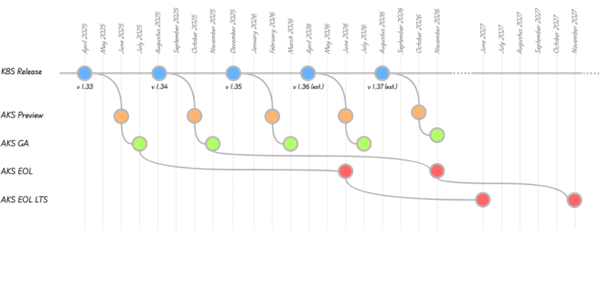
- AKS Preview
Released roughly two months after the upstream Kubernetes minor version, providing early access for testing and feature evaluation. - General Availability (GA)
Arrives one month after Preview and is fully supported for production. - Patch Releases
Delivered continuously, bringing critical security fixes, stability improvements, and component updates. - Standard Support Window (until AKS EOL)
Each GA version remains fully supported for one year. - Long Term Support Window (until AKS EOL LTS)
For organizations that value stability over rapid updates, LTS extends the support window to two years, including Microsoft‑managed backported fixes.
LTS reduces upgrade frequency for mission-critical workloads, while standard support ensures faster access to new capabilities.
Enable LTS by switching your cluster to the AKS Premium tier and selecting the LTS support plan.

OS Version Upgrades and Node Image Updates
Major OS upgrades
Major OS upgrades are not routine maintenance. They are real platform changes.
While a normal node-image update simply applies the latest patches to your existing OS version, a major OS version upgrade replaces the entire operating system underneath your Kubernetes nodes.
These upgrades typically impact:
- The kernel
- system libraries
- networking stack
- security defaults
- device drivers
- CLI tooling
- and more
Microsoft highlights that these upgrades bring new package versions, performance improvements, updated security hardening, and modernized developer tooling.
And with changes at this depth, the impact can be significant.
A major OS upgrade has the potential to break:
- Container networking components (CNI/CSI plugins)
- Ingress controllers
- DaemonSets such as monitoring or security agents
- Applications that depend on specific kernel features or OS libraries
Major OS upgrades are powerful and necessary, but they’re also high‑impact, disruptive changes that deserve careful attention.
Node Image Updates
Every node runs on a specific OS image, with its own lifecycle, complete with security patches, kernel updates, compatibility changes, and eventual retirement.
Node-level OS security updates are released at a faster rate than Kubernetes patch or minor version updates. The node OS image autoupgrade channel grants you flexibility and enables a customized strategy for node-level OS security updates.
Linux node images are updated weekly, and Windows node images are updated monthly. Image upgrade announcements are included in the AKS release notes, and it can take up to a week for these updates to be rolled out across all regions. You can also perform node image upgrades automatically and schedule them using planned maintenance.
To protect your clusters, security updates are automatically applied to Linux nodes in AKS. These updates include OS security fixes or kernel updates. Some of these updates require a node reboot to complete the process. AKS does not automatically reboot these Linux nodes to complete the update process.
The process to keep Windows Server nodes up to date is a little different. Windows Server nodes do not receive daily updates. Instead, you perform an AKS upgrade that deploys new nodes with the latest base Window Server image and patches.
Why upgrades must not be ignored
Running outdated versions introduces real risk. It can:
- Increase your security exposure
- Block you from upgrading to newer Kubernetes versions
- Break compatibility with cluster add-ons, CSI/CNI plugins, or other components
- Push your clusters out of compliance once an OS SKU reaches EOL
When an OS SKU reaches retirement, Microsoft removes the image from Azure. Your node pool can no longer scale, and you must upgrade to a supported OS version.
Upgrades relationships
When upgrading node OS versions in AKS, the most overlooked constraint is that not every OS SKU is supported on every Kubernetes version. Microsoft enforces compatibility rules to ensure the kubelet, container runtime, kernel, and system libraries remain aligned and supported.
A good example from Microsoft’s documentation:
To migrate to Ubuntu 22.04 or later, your cluster must already be on Kubernetes version 1.35+.
This means you can’t freely upgrade the OS whenever you want, your Kubernetes version determines which OS versions you’re allowed to use.
Conclusion
In short: Kubernetes gives you the engine; AKS gives you the platform to run it responsibly. It accelerates delivery, strengthens security, and keeps clusters consistent as the ecosystem continues to evolve.
AKS reduces all risks by pairing each supported Kubernetes version with a curated, validated node OS image. Azure tests these combinations so teams get a predictable and supported path forward. With AKS managing the control plane, orchestrating node image updates, and enforcing lifecycle policies, you can stay aligned with cloud best practices without constant firefighting.
My advice: Keeping AKS up to date doesn’t need to be complicated, but it does require a few consistent habits.
These principles help you stay secure, supported, and operationally predictable:
- Adopt a regular upgrade cadence: Do not wait until you’re close to end‑of‑life. Small, frequent upgrades are safer than one big jump.
- AKS supports auto-upgrade channels: Minor and patch releases are generally non‑breaking. Let AKS handle them automatically so you stay aligned with the platform.
- Enable automatic node image upgrades: Your OS image is just as important as your Kubernetes version. Keep it up to date to avoid kernel CVEs, runtime issues, and version skew.
- Plan maintenance for new AKS releases: AKS introduces new versions, OS images, and deprecations continuously. Build maintenance windows into your operational rhythm.
- Always test on non-production clusters first: Validate workloads, CRDs, controllers, and operators in a staging or pre‑production cluster before rolling upgrades into live environments.
And if you do not want to tackle this alone, Codit can assist you.
Beyond advisory and engineering expertise, Codit offers a fully managed service that ensures your clusters remain secure, compliant, and continuously updated.
If you’re looking to strengthen your AKS operations, reduce risk, and build a future‑proof platform, Codit is ready to support you every step of the way, from design through operations.
Subscribe to our RSS feed
Talk to the author
Contact Filip
Architect